

Install
- Navigate to the Integrations section from the left navigation bar in Togai
- Click on
Appsto access the list of apps with integration support - Select
Zuorafrom the available apps - Click on the
+Add connectionbutton
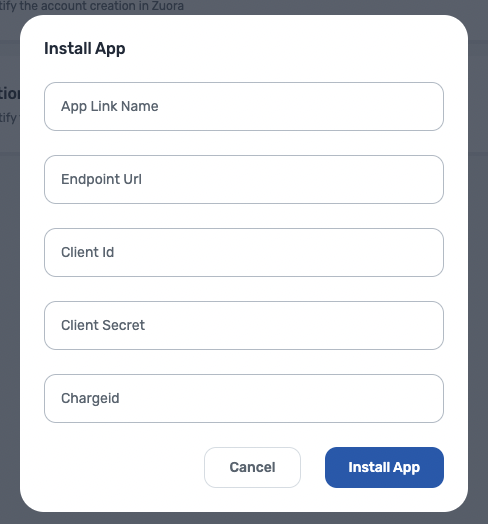
- Fill in the following details to create a connection:
- App link name: Name for the connection
- Endpoint URL: The Zuora endpoint that is required to fetch the data.
- Client ID: The Client Identifier of a Zuora OAuth Client created to authenticate the Zuora Rest APIs.
- Client Secret: The Client Secret of a Zuora OAuth Client to authenticate the Zuora Rest APIs.
- Charge ID: This is an optional field. If you want to sync the credits to Zuora from Togai, then credits will be added against this Zuora
Charge Id.
Flows
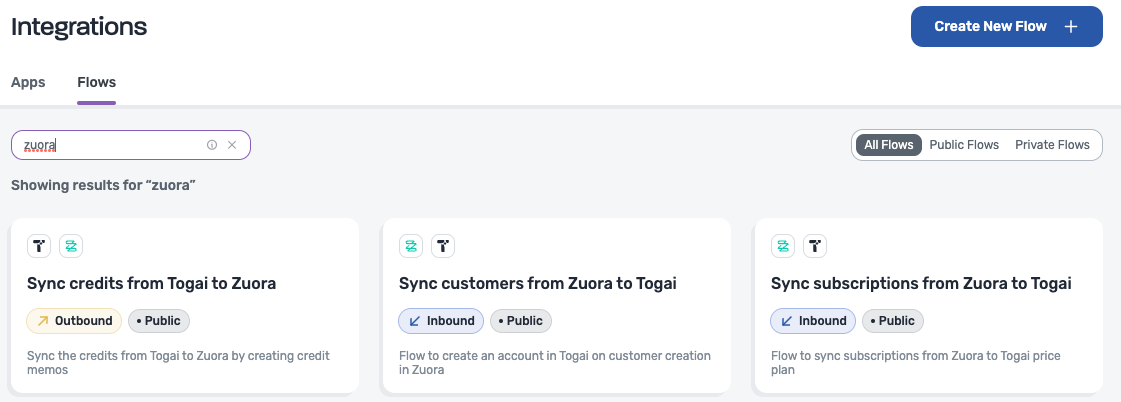
1. Sync customers created from Zuora to Togai
- The flow listens to the webhook for customer creation in Zuora.
- If a webhook for customer creation exists, Togai listens and automatically creates a corresponding customer in Togai and syncs the customer ID between Togai and Zuora.
- You can see this mapping of IDs in the Settings tab for that customer.
2. Sync subscriptions in Zuora to Togai
- When a Subscription is created in Zuora, the corresponding price plan will be created in Togai .
- The price plan will then be associated to the specific account inside Togai.
- You can see the mapping of customer ID betwee Zuora and Togai in the Settings tab of that customer inside Togai